So we have migrated to outlook.office365.com and it’s an absolute freeping disaster. The interface is absolutely ridiculous. Everything bleeds into everything else in the streams of white color. I chose the most clearly defined interface, and this is what it looks like:
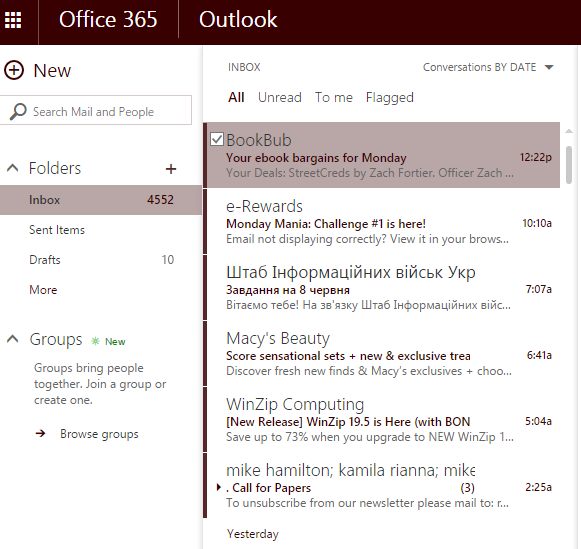
If I want to delete an email, it’s a whole process because there is no visible box next to the email to click. And the Delete button is located in a faraway and counterintuitive place. All of my folders have been destroyed, of course. And I have a filing system that is very much based on folders.
Plus, the website takes forever to open. There is literally no upside to this switch. We keep futzing with our university email every couple of years, and every change has been massively worse than whatever preceded it.

 Clarissa's Blog
Oh my Gosh. We just migrated too. And I LOATHE it. I have never had such a clumsy, unreadable, unpleasant e-mail system in all my life. I don’t know anyone who likes it. Literally. Not one person like it. I wish Microsoft would quit with their “innovations” already.
LikeLike
I get a huge number of work-related emails every day, and it’s crucial that I breeze through them as fast as I can. But this system slows me down a lot. It’s incredibly obnoxious.
LikeLike
I thought the aesthetics of Apple’s iOS 7 and 8 were horrible to the point that I agreed with people who said that it had to be “designed by kindergärtners” …
This is considerably uglier — I blame first-formers who were forced to take an abstract art class instead. 🙂
It actually looks like Microsoft has devolved its user interface standards from when it originally produced Outlook Web Access (OWA) — if you could get an OWA account instead, I would seriously consider using that.
LikeLike
It’s absolutely horrible. But something tells me that we will see another change in a couple of years, and that change will make us pine for this format.
LikeLike
We have migrated, too. I hardly ever use Office365 online (the web client you showed). I have Outlook mail client on all my computers, as well as my iPhone, and I am OK with it now.
There is always the option of setting up forward to gmail and setting up gmail to send with the school alias [it will say clarissa@gmail on behalf of clarissa@workmail]. The vast majority of my students use only gmail for everything.
LikeLike
I was given 2 copies of the thing, and they are on a shelf, unopened.
LikeLike
Hah, it let me post a comment this time.
LikeLike
Very unpredictable. But maybe whatever the bug was sorted itself out.
LikeLike
I’m interested in this because we already have Office 2010, and I suppose we could “upgrade” with the newer version, but from what you have said it sounds like a downgrade.
LikeLike
It’s a definite downgrade. The 2010 version was so much better. I don’t recommend.
LikeLike
I just noticed your inbox has over 4500 messages in it …
Most modern mail systems don’t really like having to cope with an inbox like that, so you might want to move all of that stuff to another folder, such as an archival folder.
The reason that the mail systems don’t cope well with that is that they have to append messages to the end of an ever-growing inbox data file, and that the mail systems may periodically need to re-scan the inbox data file for message headers. (In fact, the systems for incoming and outgoing mail are typically nearly entirely separate, except for a “mail transport agent” that can write to your inbox data file.)
The smaller the inbox, the better the whole thing behaves …
[and you do have considerably more crap in your inbox than I do …] 🙂
LikeLike
The messages were all sorted out in many folders. But after the migration, they just all ended jumbled up like this. Obviously, I will not be able to sort them all again.
LikeLike
To be fair I consider working wholly in the cloud to be akin to abomination anyway, so I stick with the Libreoffice installed on my hard drive. (No point in suggesting to us Linux users that Micro$oft Office is even an option! Not just because of the ideology of open source fanaticism- we literally have no Linux-compatible version so far as I am aware).
That said I do use webmail, and even somewhat questionably I have in the past occasionally emailed files to myself as temporary “poor man’s cloud storage” as it were.
This interface sounds abysmal. I mean, I got used to Office 20xx’s ribbon interface eventually- that’s not so bad. But no obvious delete facility? Seems as bad as the GEM GUI as I recall…
LikeLike
It’s horrible! Once, I open an email, the delete button disappears altogether. It’s a total mess.
LikeLike