By huge popular demand, I’m posting photos of Microsoft Office 2013. Click on the picture to see better.
Here is MS Word 2013:

I blacked out my name, so the black stains in the margins are not Microsoft’s fault. Everything else is, though. No, seriously, everything is this white in MS Office 2013.
Here is Outlook 2013. Again, I blacked out the names of my correspondents:
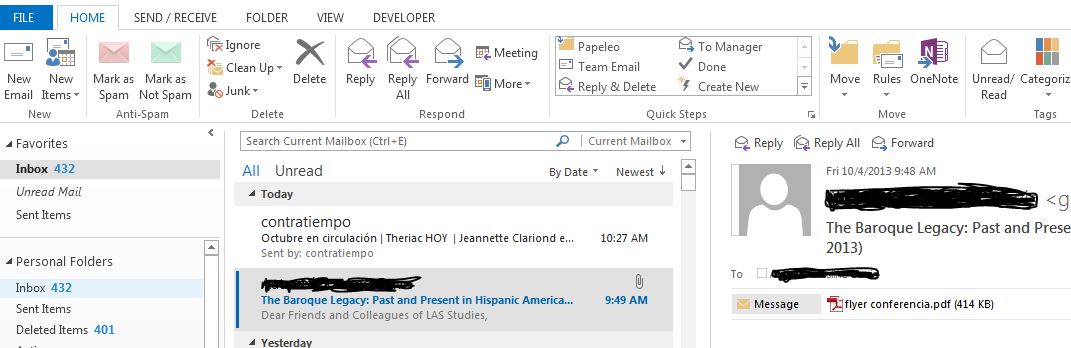
Just imagine staring at all this whiteness all day long. Whose eyes are strong enough to deal? Even my ugly blackouts represent a welcome relief from the blinding light.
The greatest problem with PowerPoint 2013 (aside form the same white interface) is that it switches to a new slide when it considers that you have spent enough time on the previous one. Teachers, beware! If you have a question on one slide and the answer on the next, PowerPoint 2013 might reveal the answer before you are ready to do so.
The selection of themes for PP2013 is also a little bizarre for my tastes:

I only worked with MS Office 2013 for one day. Who knows what I would have discovered over a month of use?

 Clarissa's Blog
Click on File -> Options -> Theme
You can choose a light and a dark gray theme. Not perfect but better than the blinding whiteness.
LikeLike
Ah, thank you! I changed it to dark grey and it is better.
THANK YOU! Maybe this thing can be somewhat tamed collectively.
LikeLike
I just found a way to make the comments visible. Now all is left is to teach the students this multi-step way of seeing the comments I leave on their papers. Why does everything have to be so complicated?
LikeLike
Slide Show -> Set Up -> Click “Used Rehearsed Timings”
If the “Used Rehearsed Timings” option has no checkmark, the slides should stop advancing.
LikeLike
I have no idea why they could make super white the default. You should never have to highlight something to see it better in the normal course of reading (iow, not studying, hiding comments in invisible ink).
The default should never be the stupidest option.
LikeLike
Clarissa, thanks so much for this thread! At first I was horrified by the screen shot but your readers have posted such helpful tips that I feel so much more confident about the newest version of Office (I was particularly troubled by the Powerpoint issue and am so grateful to Pen for giving the directions on how to turn off that “helpful” function.)
Actually, your software discussions have really helped me over the past few weeks. I need to get a new laptop and was feeling overwhelmed by choice. And so many discuss things that I don’t care about. Your discussion have really approached how an “every day user” interacts with these systems. Now I think that I will go with Windows 7 (which is a great operating system, in my opinion), avoid Windows 8 like the plague, and I will go with the newest version of Office.
I think however that I will go with Office 365. Both my partner and I need Office and Office 365 allows up to 5 downloads. I am irritated by the $100.00 a year subscription fee but, overall, it is probably the same price as those ridiculously expensive Microsoft Suites that have been offered in the past Do you have any reason why you avoided Office 365? Are there additional issues that I’m not seeing?
LikeLike
I didn’t avoid Office 365. I was given MS Office 2013 for free so that I can write a review. This is why I gave been exploring it. Next week I will spend some time working with its PowerPoint to see more specifically how it is. I think that collectively we will be able to make it serve our purposes. 🙂
LikeLike
O.M.G. We were forced to update to WinWord 2010, which is equally bad, and a real shock to the system after ten happy years with WinWord 2003. I am apoplectic after having attempted to start an ordinary letter with 1-space spacing throughout and Times New Roman 12 throughout. It makes me do a “Theme” – F the theme. In the old days you could go into the program and specify defaults, but the new one seems to make it difficult to change defaults.
LikeLike
I feel your pain, I really do. We had these 2010 packages installed on our classrooms and now I entertain students with inventive Spanish swearing whenever I have to use the computer.
LikeLike
Office 2013 is ugly. This looks like a dreadful High Contrast color theme from previous versions of Windows. I think Microsoft wants to make the user interface similar to that of a paper document to make it look organic, technologically superior, which a screen with rich colors and smooth shading is not. They appear to have intentionally limited the amount of ink/toner needed by generally not painting backgrounds and use simple shapes that can be reduced to relatively few geometric primitives, such as squares or triangles, to make it easier for the printer to rasterize them. All this is in the age where printing is done rarely. Bizzare.
(Maybe they are preparing for hi-dpi screens, because stretching a symbol of text or a plain line is easier than redrawing a piece of pixel art.)
Office 2000 was once criticised for being to monochromatic. That was generally limited to its icons and banners, because the GUI was the same standard 3D one. Then Office 2003 (along with XP) had blurry and out of focus icons. This cycle between two extremes has lasted about 14 years. Every time Microsoft makes a change it’s the most “modern” and the single right thing that everyone must accept. What goes up must come down. The number of colors and complexity is bound to increase again.
LikeLike